
Headless CMS is not the right fit for every Astro or Next.js project. Learn the exact situations where skipping it saves time, money, and complexity.
TL;DR
- A headless CMS is the wrong choice when your content rarely changes and your team has no one who can manage API credentials, webhooks, or build pipelines.
- Small sites with under 50 pages and a single author get slower builds and higher bills from a headless setup, not better performance.
- If your content editors need real-time preview, layout control, or drag-and-drop page building, most headless CMSes will frustrate them without significant custom development.
- Git-based tools like Sitepins are often faster, cheaper, and easier to maintain for developer-owned projects in Astro or Next.js.
- Use a headless CMS when content is high-volume, multi-channel, or managed by a non-technical team at scale - not by default just because you’re using a modern framework.
What Is an API-Based Headless CMS?
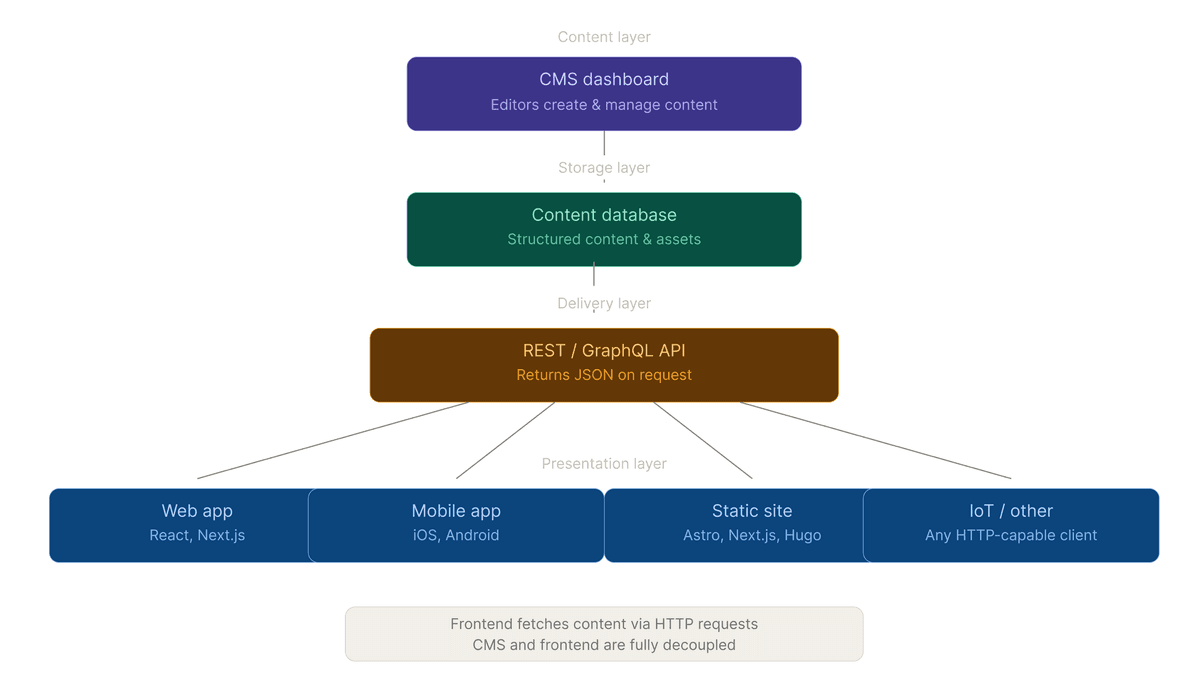
An API-based headless CMS is a content management system that stores your content in the cloud and delivers it to your site through an API (usually REST or GraphQL). The “headless” part means it has no built-in frontend. It gives you the data, and your framework (Astro, Next.js, etc.) renders it.
Popular examples include Contentful, Sanity, Storyblok, Hygraph, and Payload CMS. They work well for the right projects. The problem is that developers often reach for them by default when building with modern frameworks, regardless of whether the project actually needs them.
Why Developers Default to Headless CMS and When That Goes Wrong
The assumption is: modern framework + headless CMS = professional setup. That logic breaks down fast on smaller or simpler projects.
A headless CMS adds at least three moving parts your project didn’t have before: an external API dependency, a webhook-triggered build pipeline, and a separate login system for content editors. On a marketing site with 20 pages that gets updated once a month, those parts create overhead without solving any real problem.
The actual question to ask before adding any headless CMS is: who is editing this content, how often, and does the delivery mechanism matter? If the answer is “a developer, rarely, and no,” you probably don’t need one.
6 Situations Where You Should Skip the Headless CMS
1. Your Site Has Under 50 Pages and One Content Author
Small sites don’t benefit from a headless CMS. If your Astro or Next.js project has a handful of blog posts, a few landing pages, and one person writing everything, MDX files in your repo are simpler and faster.
With a Git-based setup, content lives in the same repository as your code. You edit a file, push a commit, and the site rebuilds. There’s no API token to rotate, no CMS dashboard to manage, and no third-party service in your critical path. Tools like Sitepins give you a clean editing UI on top of that Git workflow, so non-developers can still write content without touching a terminal. Astro’s content collections and Next.js’s next-mdx-remote both handle this setup cleanly without any external API dependency.
2. Your Content Editors Need Real-Time Visual Editing
Most API-based headless CMSes separate content entry from layout. An editor writes text in a structured form (title field, body field, image field), and a developer controls how that content looks on the page.
That works fine for blog posts. It falls apart when your client or content team expects to drag elements around, adjust spacing, or build page sections visually without filing a developer ticket. Tools like Storyblok offer a visual editor, but even then, getting it to work correctly with Next.js or Astro requires custom block mapping, rendering logic, and non-trivial configuration.
If your project needs true visual page building, a headless CMS is not the right tool. A builder like Framer, Webflow, or a WordPress block editor will match the editorial workflow better.
3. You’re Building a Static Site That Rarely Changes
Astro is purpose-built for static output. If you’re building a documentation site, a portfolio, or a company brochure site that gets updated a few times a year, pulling content from a remote API on every build is unnecessary complexity.
The API-based model works well when content changes frequently enough to justify the pipeline. A site that changes quarterly doesn’t need a CMS with webhooks, build triggers, and API rate limits. It needs a Markdown file in a folder and a tool like Sitepins to edit it without leaving the browser.
4. Your Budget Can’t Support API Pricing at Scale
Free tiers on headless CMSes are narrow. Contentful’s free tier currently allows for 100,000 API calls per month and 25,000 content records, an increase from previous years though it remains restricted to a single starter space. Sanity’s free tier is more flexible but can be stricter on traffic, offering 1,000,000 API CDN requests and 250,000 direct API requests monthly with a 100GB bandwidth limit.
For a high traffic site, those limits hit fast. A marketing site getting 100,000 monthly visitors with Incremental Static Regeneration (ISR) in Next.js can easily consume API credits across preview requests, build time fetches, and on demand revalidation. Once you exceed the free tier, costs can reach $300 to $500 per month for mid tier plans. For example, Contentful’s Basic plan starts at $300 per month for a single project. These costs mount before you have paid for hosting, monitoring, or anything else.
If budget is fixed and traffic is meaningful, the API cost structure of a headless CMS deserves a serious look before you commit to it.
5. Your Team Has No One to Manage the Integration
An API-based CMS is not plug-and-play with Astro or Next.js. Someone has to write the data-fetching logic, handle API errors, configure environment variables, set up webhooks to trigger builds on content changes, and test the pipeline end to end.
In a small team or solo project, that work lands entirely on the developer. And it’s ongoing: API versions change, tokens expire, webhook endpoints break when you migrate hosting. If no one on the team owns that integration, it will eventually fail silently - content won’t update, builds won’t trigger, and debugging it means digging through logs across three separate platforms.
For projects without a dedicated developer to maintain the integration, a Git-based CMS like Sitepins is easier to keep running. Content stays in your repo, there’s no external API to break, and the editing interface works without any custom integration code.
6. Your Content Is Highly Relational and Deeply Structured
This one surprises people. Headless CMSes are good at delivering flat or lightly structured content. They get painful when your content has deep relationships: posts with multiple authors, each author linked to a bio, each bio linked to a department, each department linked to projects.
Querying deeply relational content through a REST or GraphQL API means either making multiple round-trip requests (slow) or writing elaborate GraphQL queries that are fragile when schema changes. A traditional relational database with a server-rendered framework handles this more naturally. If your data model looks like a database schema with foreign keys, build it like one.
Git-Based CMS vs. API-Based CMS: Which Fits Your Project
| Factor | Git-Based (Sitepins, Decap) | API-Based (Contentful, Sanity) |
|---|---|---|
| Content editors | Developers and content editor comfortable with Git | Non-technical editors at scale |
| Page count | Under 200 pages | Hundreds to thousands |
| Update frequency | Infrequent (weekly or less) | Daily or continuous |
| Multi-channel delivery | Single site | Multiple apps, sites, or platforms |
| Budget | Free or less than $20 month | $50 - $500 month at scale |
| Setup complexity | Low | Medium to high |
| API dependency | None | Yes - external service required |
When an API-Based Headless CMS Is the Right Call
To be direct: headless CMSes are genuinely good for specific situations. Use one when your content team is non-technical and needs a proper editing interface, when you’re delivering content to more than one frontend (a website, a mobile app, and a digital display, for example), or when your site publishes dozens of pieces of content per week and needs editorial workflows like drafts, approvals, and scheduled publishing.
Next.js’s ISR and Astro’s on-demand rendering modes are built with this use case in mind. At that volume and complexity, the API overhead is worth it.
The mistake is treating headless CMS as a default architectural choice for every Next.js or Astro project. It’s a tool for a specific job. When the job is simpler, use a simpler tool.
Common Mistakes Teams Make When Choosing a Headless CMS
- Picking a CMS before defining who will edit content and how often. If the answer is “a developer, occasionally,” you don’t need a CMS at all.
- Assuming the free tier will last. Most projects outgrow free tiers within 6 to 12 months once traffic and content volume grow.
- Building around the CMS’s data model instead of your content’s actual structure. Shoehorning relational data into a CMS’s field types creates technical debt that compounds over time.
- Skipping the webhook pipeline in development and then discovering it doesn’t work on the first content update in production.
- Choosing a CMS because it has good documentation for React, without checking whether it has a proper Astro integration. Several major CMS platforms still lack first-party Astro SDK support as of 2026.
What to Use Instead: A Quick Decision Guide
If your project fits any of the scenarios above where headless CMS doesn’t make sense, here’s what to reach for instead:
- Static site with developer-owned content: Astro content collections with MDX files. No external dependency, zero cost, full type safety with Zod schemas.
- Small site needing a non-technical editing UI: Sitepins (Git-based, works with Astro and Next.js out of the box), Tina CMS, or Decap CMS.
- Complex page-building requirements: Storyblok (if staying headless) or Webflow/Framer (if the whole site can live there).
- Deep relational data: A PostgreSQL database with Prisma and a server-rendered Next.js app, or a traditional CMS like WordPress used headlessly only if multi-channel delivery is actually needed.
The framework doesn’t decide the CMS. The content workflow does.
Frequently Asked Questions About Headless CMS with Astro and Next.js
What is an API-based headless CMS?
An API-based headless CMS stores your content in a cloud-hosted system and delivers it to your site through a REST or GraphQL API. Your frontend framework like Astro, Next.js, or anything else fetches that content at build time or request time and renders it. The CMS has no frontend of its own; it only manages and delivers data.
Is a headless CMS necessary for Astro or Next.js projects?
No. Both Astro and Next.js work fine with local Markdown or MDX files, Git-based CMSes, or no CMS at all. A headless CMS is the right choice when a non-technical team manages content at volume. For developer-owned projects or small sites, it adds complexity without a clear benefit.
What is the difference between a Git-based CMS and an API-based CMS?
A Git-based CMS (like Sitepins, Decap CMS) stores content as files in your Git repository and lets editors manage that content through a UI without touching Git directly. An API-based CMS (like Contentful or Sanity) stores content on external servers and delivers it through an API. Git-based options are simpler and free but less suited for large editorial teams. API-based options scale better for multi-user, multi-channel publishing but cost more and require active integration maintenance.
What happens to my site if the headless CMS API goes down?
If you’re using static generation (SSG) in Astro or Next.js, your published site stays up - it’s already built. But new builds will fail until the API comes back online, meaning content updates won’t go live. If you’re using server-side rendering (SSR) or on-demand revalidation, API downtime can directly affect live pages. This is a real availability risk that needs a caching strategy to manage.
Can I switch from a headless CMS to MDX files later?
Yes, but it takes real work. You’ll need to export your content from the CMS, reformat it as Markdown or MDX, restructure your data-fetching code, and rebuild your content pipelines. Most headless CMSes export to JSON, so migration is possible. Plan for a week or more of engineering time depending on content volume. Doing this migration on a 500-post blog is significantly more effort than on a 20-page marketing site.
Which headless CMS works best with Astro?
As of 2026, Storyblok, Sanity, and Hygraph remain the top recommendations for Astro due to their mature, dedicated integrations. Contentful has also streamlined its experience, now offering an official Contentful SDK for Astro that simplifies data fetching without needing manual logic or extra client side JavaScript.
For Git-based workflows, Sitepins has become a popular Git-based choice for Astro projects. Sitepins connects directly to your GitHub repository and adds a clean, visual WYSIWYG editing layer over your Markdown or MDX files without requiring a separate database.